

If you’ve been doing SEO for a long time, you may have discovered that putting a lot of keywords into separate blog posts doesn’t work anymore. Google is smarter now. It’s not just looking for pages that match keywords; it’s also looking for websites that show true knowledge about whole themes. That’s when subject clusters come in.
I’ve dealt with a lot of clients that had trouble getting good rankings even though they published good content. What is missing? They weren’t gaining authority on the subject. Their content was stored in several places, making it hard to find and use. After we reorganized their sites into topic clusters, everything changed. Their sites finally got the attention they deserved as their rankings went up, their organic traffic went up, and their sites got more traffic.
I’m going to show you step by step how to develop topical authority with subject clusters and pillar content in this article. This method works for any service-based website, whether it’s for healthcare, real estate, or something else. And if you’re using WordPress, which is what most of my clients do, I’ll teach you how to put the steps into action.
What Are Topic Clusters, and Why Are They Important for SEO?
Think of your website as a library. Before, SEO was like having a lot of books all over the place with no order. What are topic clusters? They’re like having a library that is well-organized, with obvious divisions, subsections, and a card catalog that ties everything together.
A topic cluster is a way to organize your material by making one big pillar page that covers a wide range of themes and then adding a number of smaller cluster pages that go into further detail on certain subtopics. All of these pages link to each other in a way that tells Google, “We’re the experts on this topic.”
This is important since search engines are no longer just matching keywords. Now they look at how relevant the issue is and how deep the content is. When you group content together, you’re basically saying to Google, “We don’t just have one article about this; we’ve covered every angle, answered every question, and given you all the information you need.”
The outcomes speak for themselves. Real-world case studies reveal that websites that use topic clusters have seen their traffic go up by 20–30% and their rankings go up for hundreds of related keywords. A business that used a product launch subject cluster ranked for more than 1,100 keywords and got about 100 organic clicks every day, all without any active link building.
What Is Topical Authority SEO?
Let’s be clear about what topical authority really is. It’s not about being well-known or having a lot of backlinks (though those assist). Search engines see you as an expert on a certain topic when you have topical authority.
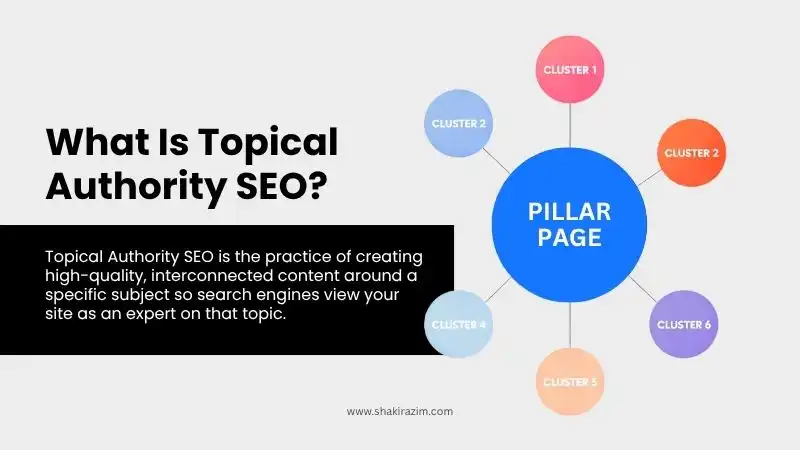
Building topical authority means more than just making individual pages better. You’re building a complete database of information on a subject from every possible point of view. This is really important because Google’s algorithms increasingly favor sites that show they know a lot about a whole subject, not just a few keywords.
Put yourself in Google’s shoes. Which site should show up higher when someone types “social media scheduling tools” into a search engine? Which one is better: the one with just one blog post about scheduling or the one with a full pillar page about scheduling software, plus several posts that go into more detail about certain capabilities, comparisons, integration guidelines, and use cases? The second site shows a lot more knowledge.
To build topical authority, you need to cover all the associated subtopics in depth on a network of sites that are linked to each other. The method works because search engines can easily see how knowledgeable your site is based on the amount and organization of its information. Pages having a lot of topical authority get a lot more traffic than pages with little authority. That’s because Google gives higher rankings to sites that show their knowledge by covering a lot of ground and organizing it well.
You may have seen my prior post about The Complete Internal Linking Strategy for SEO Authority, which talks about how to link your material in a smart way. When you use clustering to build topical authority, internal linking can really boost your rankings. Both tactics operate together to show search engines that you know what you’re talking about.
The Foundation: SEO for Pillar Pages
The pillar page is the most important part of your subject cluster approach. Think of it as the ultimate guide—the greatest place to find information on your selected wide topic.
A well-optimized pillar page can do a lot of things. First, it focuses on a high-volume, short-tail term that sets the limits of your topic. Second, it gives an outline of all the main subtopics, which helps readers know what you will be talking about. Third, it serves as the center that links all of your cluster material together through internal linking.
The best length for a pillar page is between 3,000 and 5,000 words, with 3,000 being the best. You want to cover everything without making your audience feel overwhelmed. The content should be organized in a way that makes sense, usually following the buyer’s journey from being aware of a product to thinking about it to making a decision.
What makes a pillar page work is:
Targeting keywords strategically means focusing on one wide, high-volume keyword as your main goal. For instance, if your pillar is about content marketing, your core keyword should be “content marketing” and not a long-tail version of it.
Full coverage of all subtopics: Your pillar page should cover all of the main subtopics in your cluster. You don’t have to go into detail about each one; that’s what cluster sites are for. But you should at least link to them and give a brief introduction.
To make your design more user-friendly, add a table of contents, clear section titles, pictures, bullet points, and short paragraphs. Your pillar page will be long, so make it easy to scan.
A strong internal linking structure means that every cluster page should link to the pillar and the pillar should link to every cluster page. This two-way connecting strengthens your signal of topical authority.
I constantly say that the material on your pillar page should not be gated. You want search engines to look at and index everything. If you want to get leads, don’t hide the core material behind a form. Instead, provide a downloadable PDF version as a content upgrade.
According to Backlinko’s detailed guide to pillar pages, this structure helps develop clear topical authority and can help pages rank for hundreds of related keywords. Their “Link Building for SEO” pillar page shows how smart organization may make hundreds of keyword variations more visible.
How to Make Your Topic Clustering Plan
Before you write a word, you need to think ahead to make a good topic cluster. This is the methodical way I work with each client.
Step 1: Pick Your Main Topic
Start by choosing a general topic that fits with your business goals and the interests of your audience. The subject should be related to what you do, have a lot of people looking for it, and be able to support more than one subtopic.
If you own a healthcare PCD franchise, for instance, a good main topic may be “Thyroid Health Management” instead of anything too specific like “levothyroxine dosage.” The broader topic lets you write more articles that support it while still being relevant to your services.
Step 2: Do a Thorough Search for Keywords
Use tools like Ahrefs, SEMrush, or even Google’s autocomplete to find all the keywords and queries that are linked to your main theme. You want three kinds of keywords:
Phrase match terms: Words that include your primary topic phrase in them, such as “topic clusters for beginners” or “topic clusters examples.”
Exact match variations: Keywords that are exactly the same as your topic, such as “topic clustering” or “topic cluster model.”
Semantically related terms: Keywords that don’t have your phrase in them but are related in meaning (for example, “content architecture” and “site structure optimization” for “topic clusters”).
I like how Ahrefs looks at keywords in a broad way. It helps me find these related keywords that boost your topical authority. When you map keyword relationships, make sure to look for semantic links that aren’t always clear right away.
A company made a topic cluster about “product launch” in the real world. They found 16 subtopics using mostly phrase match terms like “product launch strategy,” “product launch plan templates,” and “product launch marketing plan.” This focused approach helped them rank for more than 1,100 keywords.
Step 3: Plan Out How Your Cluster Will Look
Put your keywords into groups that make sense. You will start with one pillar page and usually six to ten cluster pages. Don’t try to do everything at once. You can add more to your cluster over time as you gain authority.
For each subtopic, ask yourself, “Does this need its own article?” If the subtopic gets a lot of searches and can support 1,000 or more words of original content, it would make a decent cluster page.
Step 4: Make a Plan for When You Will Make Your Content
Plan your publishing order carefully. A lot of SEO experts say that you should publish the pillar page first and then build cluster content around it over time. Some people like to make some cluster content first and then launch the pillar page as the link between them. Either way works; what counts is doing it consistently.
The most important thing is to keep the quality high. Every item in your cluster should add real value and show that you know what you’re talking about. You are creating topical authority, which means that every item you write helps Google see your site as an expert on this area.
If you want to learn more about planning content, read my guide on Content Strategy for Creators: How to Grow Your Blog & Brand. You can use those ideas to plan out your subject cluster publishing schedule.
Long-Tail Keywords SEO: Helping Your Topic Cluster
Your pillar page should focus on broad, high-volume keywords, while your cluster content should focus on long-tail keywords. Long-tail keywords are longer, more precise search phrases that usually have lower search traffic but higher conversion intent.
Long-tail keywords are important for topic clusters since they let you cover all the many aspects of your main topic. If your pillar site is about “social media marketing,” for example, your cluster pages might be on long-tail keywords like “social media marketing for real estate agents” or “best times to post on social media to get people to engage.”
Here’s why long-tail keywords are so important for establishing topical authority:
Less competition: Long-tail keywords are usually easier to rank for because they have lower keyword difficulty. This is especially true for younger sites. This helps you win quickly while you work your way up to more competitive terms.
More specific intent: Someone looking for “best email marketing software for small business” has a lot clearer idea of what they want than someone merely looking for “email marketing.” These kinds of questions generally lead to more sales.
Comprehensive coverage signal: When you score for a lot of long-tail keywords that are connected to your issue, it tells Google that you’ve covered it extensively. This full coverage makes your pillar site more likely to rank well.
The strategic relationship between pillar pages and cluster material works like this: Your pillar page shows that you know a lot about the primary topic, and your cluster pages show that you know a lot about specific questions and use cases. Together, they form a huge content network that rules the search results for your topic.
When using long-tail keywords in your clusters, pay attention to what people are looking for. Sort keywords into groups based on the kind of information people are looking for, such as how-to manuals, product/service reviews, or informational articles. This intent-based clustering makes sure that your content is what users really need.
I have a full Ultimate On-Page SEO Checklist that covers everything from keyword placement to schema markup that makes your cluster pages stronger. This will help you make sure that your long-tail content is optimized correctly.
Organizing Your Content With Keyword Clustering for SEO
Grouping comparable terms together based on their meaning and the reason someone is searching for them is called keyword clustering. This is an important step in making good subject clusters since it makes sure that your content covers all the important points without making pages that compete with each other.
A lot of website owners have this problem: they write a lot of articles that target the same keywords, which leads to keyword cannibalization. This happens when your own sites compete with each other in search results. By helping you figure out which phrases should be included in one big article and which should have their own pages, proper keyword clustering stops this from happening.
Keyword clustering is a lot easier with modern SEO tools. Ahrefs, SEMrush, and other specialist clustering tools employ natural language processing and machine learning to look at how keywords are related to each other. These programs look at which keywords tend to rank for the same URLs and then put them into groups.
Here’s a simple way to put that into practice:
Export your target keywords: Get keywords from your keyword research tool along with information on how many people search for them and how hard they are to rank for.
Use clustering tools: You can use Keyword Insights, Keyword Cupid, or even Ahrefs’ built-in clustering functionality to upload your list of keywords. These programs will put keywords that are similar together on their own.
Look over the clusters: Check to see if the groups make sense. Sometimes you’ll need to make changes by hand based on the content strategy and commercial context you have.
Map keyword clusters to content pieces: In your topic cluster approach, each keyword cluster turns into either a pillar page or a cluster page.
For example, if you’re writing about “home office setup,” your keyword clustering might show you groups like “home office desk setup,” “home office lighting,” “home office organization,” and “home office productivity.” Each cluster could be its own article, all linking back to your main pillar page on home office setup.
The main point to remember is that keyword clustering keeps you from having gaps in your material and stops you from repeating yourself. You make sure that every relevant subtopic is addressed without making duplicate sites that compete for the same keywords.
WordPress Content Architecture: Practical Implementation
If you use WordPress to manage your website (and statistically, there’s a decent chance you do), you need to know how to use WordPress’s built-in organizational tools to set up subject clusters.
WordPress lets you organize your content in two useful ways: using categories and tags. When utilized correctly, these tools will naturally help your topic cluster architecture.
Using Categories for Topic Clusters
Categories are like the main subjects of your site. Every significant topic cluster should have a category in WordPress. If you’re making groups around “SEO,” “Content Marketing,” and “Social Media Marketing,” these are your key categories.
Parent and child categories in WordPress construct hierarchical structures. This hierarchy is a fantastic match for the structure of your topic cluster. Your parent category is your main topic, and your child categories are clusters of important subtopics.
Here’s a useful way to put things up:
Make no more than 5–10 key categories, each of which should cover a core pillar issue. Don’t have too many categories; they will make your topic less clear.
Only use child categories when you really need to break up a topic into smaller parts. There could be child categories like “WordPress Plugins” and “WordPress Speed Optimization” under a parent category called “WordPress SEO.”
Give each post one main category. Having more than one category for each content can make your site harder to navigate and weaken your topical authority signal.
WordPress: Strategic Internal Linking
Topic clusters truly come to life in WordPress when you use internal linking. Your pillar page should link to every cluster article, and every cluster article should link to your pillar page.
Here are the best ways to use internal links on WordPress blogs to make your subject cluster stronger:
Link high in your content: Put your most significant internal links at the top of your text, in the first few paragraphs. Links that are placed early get clicked on more often and pass more authority.
Use descriptive anchor text: The text you use as an anchor should make it clear what readers will find on the page they are linking to. Instead of saying “click here,” utilize anchors that are full of keywords, such as “learn more about how to use schema markup.”
Use breadcrumbs: Breadcrumb navigation automatically makes linkages between child pages and parent categories that show how they are related. This strengthens the structure of your topic clusters throughout the site.
Make cornerstone content links: You can mark your pillar pages as cornerstone content in WordPress SEO plugins like Yoast SEO or RankMath. After that, the plugin will remind you to link to these crucial pages from posts that are connected to them.
Use category and tag archives: WordPress makes archive pages for categories and tags on its own. Make these archive pages better by adding unique descriptions and treating them like essential landing pages that link related cluster material.
I usually set up WordPress sites for my clients so that the pillar page is a separate Page (not a Post) and all the cluster content is Posts that are assigned to the right categories. This makes it easy for both users and search engines to find their way around the defined hierarchy.
One key technical note: if you use hierarchical URLs that have category names in them, be mindful of duplicate content problems if postings show up in more than one category. By default, WordPress does this with different prefixes, but it’s a good idea to keep an eye on it in Google Search Console.
How to Measure and Keep Track of Your Topical Authority
Making topic clusters is only the first step; you need to see if your plan is really functioning. Checking a single statistic isn’t enough to quantify topical authority, but there are a number of solid ways to keep track of your development.

Ratio of Topical Authority
The topical authority ratio is one of the easiest ways to measure topical authority. This tells you what percentage of your site’s content is about a certain subject.
The math is easy: take the number of pages on your site that are about a certain topic and divide it by the total number of pages that are indexed.
If your site has 100 pages and 15 of them are about “keyword research,” your topical authority ratio for keyword research is 15%.
You may use Google search operators to figure this out. To find out how many pages are about a certain topic, use site:yoursite.com intitle:"your topic" and then divide that number by the total number of pages you have indexed. This indicator is easy to understand and gives you a fast look at how much information you’re putting on each topic.
Keyword Coverage and Rankings
The best way to find out how much topical authority you have is to keep note of how many related keywords you rank for and where you rank for those keywords.
Ahrefs and SEMrush are two tools that make this easy. Type in your domain, choose keywords that are connected to your topic cluster, and keep an eye on:
The total number of keywords you rank for in this topic area
How many are in the “featured” zone, which is places 1–3?
How many people are in the top 10 (first page)?
Your share of traffic for keywords related to the issue compared to your competitors
To get a full picture, compare your keyword coverage to that of your top competitors. If you rank for 50 keywords in your niche while your competitors rank for 200, you’ve found a big chance to grow your cluster.
Analysis of Topic Share
Topic share evaluation lets you figure out how much of the total search traffic for a topic your site gets compared to the whole market.
This measure goes beyond just collecting keywords to look at how much traffic they actually bring in, which gives you a more accurate picture of how well you dominate a topic. It’s the difference between having material about a topic in theory and actually getting visitors from that topic.
Metrics for User Engagement and Behavior
It’s not just about where your content ranks; it’s also about whether it really is a useful resource. Keep an eye on these signs of engagement:
Average time spent on a page with subject cluster material
The bounce rate for pillar and cluster pages
Click-through rates between cluster pages within the same site
Pages per session for visitors that come to the site through subject cluster content
High engagement metrics show both search engines and you that your content really addresses users’ questions and shows that you know what you’re talking about.
Analysis of Content Depth
Clearscope and MarketMuse are two tools that assess how well your content covers a topic compared to that of your top competitors. These platforms look at:
Incorporation of pertinent subtopics and associated inquiries
How much information is given
Using reliable sources and evidence to back them up
These tools cost money to use, but they can help you find holes in your content that could make you more authoritative on the topic.
Instead of seeking for quick results, the best way to measure topical authority is to keep track of progress over time. It usually takes 3 to 6 months for topic clusters to demonstrate big ranking benefits, as search engines see how well you cover a topic and how well your internal linking structure works.
A lot of the tracking and measuring tools I just talked about are also covered in my article about Best SEO Tools (Free & Paid). There are in-depth assessments of techniques for measuring topical authority there.
Things to Avoid When Making Topic Clusters
I’ve seen the same problems again and over again when I’ve used topic clusters for dozens of clients. Here’s what you shouldn’t do:
Making shallow content just to fill cluster spots: Quality is always better than quantity. One in-depth, useful cluster article is worth more than five short entries that don’t go into much detail. Every article should show that you know what you’re talking about and be useful.
Not linking your pages together: The links between your pillar and cluster pages are not optional; they are essential. I’ve seen sites make great material that never gets topical authority because the pieces are all separate. Connect your pillar to each cluster page, and then connect each cluster page back to the pillar.
Picking themes that are too wide or too narrow: Your pillar topic should be broad enough to include a lot of subtopics but concentrated enough to show that you know a lot about it. “Marketing” is too general, and “email subject line length” is too specific. “Email marketing strategy” is the best way to go.
Forgetting about user intent: Don’t just go after keywords; think about what information searchers really need. People who search for “product launch checklist” want a real checklist, not simply an article about why checklists are important. Make sure your content format meets what users expect.
Publishing everything at once and then leaving the cluster: Topic clusters should expand and change over time. Begin with your pillar and 6–10 cluster pages, and then keep adding additional depth over time as you find fresh keyword opportunities and content gaps.
Ignoring WordPress organization: If you use WordPress, use categories and tags to strengthen your cluster structure. Putting all of your content in “Uncategorized” is a waste of a useful organizational function that both users and search engines depend on.
My guide on 10 Common SEO Mistakes That Hurt Rankings (and How to Fix Them) goes into more detail about SEO mistakes that hurt topical authority. Some of such faults make clusters less effective right away.
What to Expect From Your Topic Cluster Strategy: Real Results
Let’s talk about what you can really expect. Topic clusters won’t make your site rank higher overnight; they’re a long-term investment in your site’s authority.
Here is what you can usually expect based on documented case studies and results from my own clients:
First 1–3 months: Search engines start to index your new cluster content, and it starts to show up in search results for long-tail keywords. Some cluster pages will probably rank between 11 and 20 for their target keywords. This is normal; you’re laying the groundwork.
Months 3–6: Rankings go up as search engines see the full coverage and internal linking patterns. Your pillar page will start to rank for more general terms, and your cluster pages will start to show up on the first page. During this time, traffic usually goes up by 15 to 30%.
Months 6–12: This is when subject clusters truly start to work. Your pillar page should rank highly for your major goal keyword, and the cluster pages should bring in a lot of traffic for dozens or hundreds of related long-tail terms. After full execution, the case study discussed earlier showed ranks for more than 1,100 keywords.
After the first year: Your established topic cluster becomes a growing asset. Your thematic authority grows even greater as you add more cluster content and gain backlinks. New cluster content will rank faster because you already have authority in the topic area.
Topic clusters are great since they give SEO value that lasts. A well-structured subject cluster gains momentum over time, with each new piece making the whole network stronger. This is different from individual blog entries that could rank for a short time and then fade.
I’ve seen similar tendencies in my work with clients, especially in the healthcare and real estate industries where I focus. The method works on a larger scale because the basic idea behind it—showing competence through detailed, interrelated content—is how Google rates sites.
How to Use Schema Markup for Topic Clusters
Topic clusters work mostly by how you organize your material and link to it from other pages on your site. However, using the right schema markup makes it easier for search engines to understand how your clusters are set up. Schema markup helps Google figure out how your pillar and cluster content are related to each other.
To get the most SEO benefits from your subject cluster, I suggest reading my in-depth post on Schema Markup Essentials: Boost Your Search Visibility with Structured Data. You’ll learn how to use Article schema, BreadcrumbList schema, and maybe even FAQPage schema to make your signals of topical authority stronger.
Your Topic Cluster Action Plan for the Future
You now have all the information you need to develop topical authority using subject clusters. What’s your next move?
Find your first pillar topic. This should be something that is directly related to your business, gets a lot of searches, and supports a number of subtopics. Don’t try to make five clusters at once. Pick one, do it well, and then go on to the next.
For practical use, I suggest this order:
Week 1: Do a lot of research on the keywords for the topic you choose. Find your main keyword and at least six to ten keywords that support it.
Week 2: Make thorough outlines for your main page and the articles in your cluster. Plan out how each element in the cluster will connect to the others.
Weeks 3–6: First, write and publish your pillar page. Make it complete, easy to read, and useful enough to be the go-to source on your subject.
Weeks 7–14: Make sure to constantly create and publish your cluster material. Every week, you should write at least one good cluster article that links to the pillar page and includes relevant internal links to your other material.
Ongoing: Keep an eye on your rankings and traffic for keywords connected to your topic. Find gaps in your content and chances to create more cluster pages. Keep your cluster material up to date and complete by adding to it.
Keep in mind that topic clusters work because they are similar to how search engines currently judge competence. Instead of looking at individual sites with a lot of keywords, they look at information that is complete and related and shows actual knowledge on a subject.
If you want to do well with SEO these days, you need to use topic clusters. They’re not optional anymore. The sites that show up first in search results don’t have the most content; they have the most well-organized content that makes it evident that they are the experts on the subject.
It’s possible that your competitors are still employing the old method of writing one blog post at a time. If you use topic clusters now, you’ll be able to establish authority in your niche before your market catches up.
Check out my full The Complete SEO & Digital Growth Guide for a complete look at modern SEO strategy. It talks about the bigger picture of how subject clusters fit into an overall SEO strategy.
Six months ago was the perfect moment to start creating topical authority. Today is the second best time.
I assist clients come up with and carry out whole SEO plans that get genuine results. If you need help setting up subject clusters for your website and business goals, I can help. Contact me to talk about how subject clusters might improve your site’s visibility and authority.
Sites that create clear topical authority will be the ones that do well in SEO in the future. Today is the day to start creating your topic cluster. Your ranks and authority will rise.