
You probably came here because you’ve spent a lot of time and effort making a WordPress site, but search traffic is still too low. I understand. Many website owners run into this exact issue—despite great content, their Google rankings never improve, often because effective WordPress SEO Optimization hasn’t been implemented.
What is the truth? It doesn’t have to be as hard as the internet makes it sound to do SEO on WordPress. What matters most is knowing what really makes a difference and what is merely noise.
WordPress allows you a lot of freedom, but that freedom also means you need to make conscious choices about SEO. This guide shows you exactly what works, not just in theory but in practice. It shows you real tactics that have helped client websites go from being invisible to being ranked.
Why WordPress SEO Optimization is Still Important
Before we get into strategies, let’s talk about why this is important.
When Google started putting user experience on the same level as content quality, things changed. WordPress is still one of the finest platforms for SEO, though, because it handles the technical side of things rather effectively right out of the box. The platform makes clean code, works well with schema markup, and works well with SEO tools.
That being said, “reasonably well” isn’t good enough anymore. You need to make sure that everything is optimized on purpose, from how quickly your pages load to how search engines interpret the structure of your material. This complete guide will teach you exactly what to pay attention to.
The WordPress SEO Foundation: What Really Works
Let me start with something that most people don’t see. They make each page as good as it can be, as if it were the only one. But genuine WordPress SEO is about making content that is linked together in a way that helps both visitors and search engines realize how authoritative your whole site is.
You aren’t just creating blog entries, therefore think of it this way. You’re putting together a structure of knowledge. Your WordPress site structure should answer all of your inquiries, and each piece of content should complement the others by linking to them in a smart way.
This is where a lot of site owners go wr>Setting up your internal linking strategy correctly from the start will save you years of regret.
1. Technical SEO: The Hidden Base
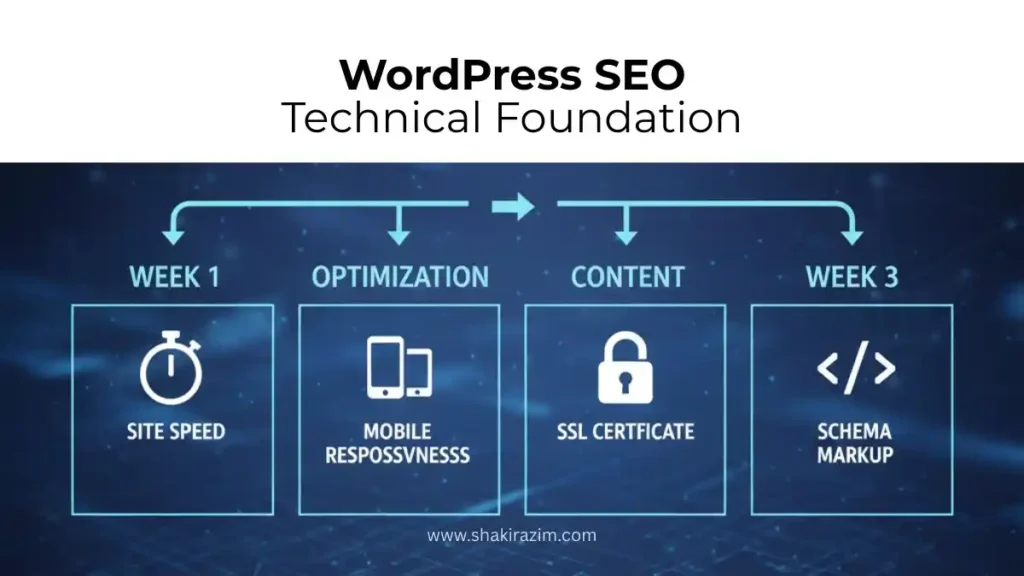
Google can only crawl and index your material correctly if your website’s technical health is good. If you don’t do good technical SEO, it’s like building a house on shaky ground: everything else falls apart.
This is what demands your attention:
You might not think that site speed is important
Page speed really does effect both rankings and conversions. This is really evident from what Google has said. A site that loads slowly loses visitors and looks weak to search engines.
You have a few options for WordPress:
- Get a performance plugin like WP Rocket or LightSpeed Cache. These take care of compression and caching in the browser on their own. The change is seen right away, and it often cuts load times in half.
- Use a CDN, like Cloudflare or QUIC.cloud. This spreads your material out over different locations so that users may download it from servers that are closer to them.
- Make sure to optimize photos as much as possible. Most WordPress blogs get too big because of big graphics. Use tools to compress without losing quality.
Honestly? Site speed is one area where effort delivers quick wins. Focus here first. One of the most valuable resources I’ve found for this is the official Google PageSpeed Insights documentation, which tells you how well your site is doing in real time.
Mobile responsiveness is a must
There is no room for debate on this. Most of the traffic comes from phones and tablets. Your WordPress theme needs to look great on phones and tablets. You’re probably fine if you use recent themes like Astra or Blocksy. But try it out for yourself: open your site on a phone and spend five minutes looking around.
Does the text change size correctly? Are the buttons easy to press? Does the layout stop working on any screen size? Before moving on to more complex approaches, fix these.
SSL Certificate and HTTPS
All WordPress sites need SSL (HTTPS). Not because it’s cool, but because Google clearly likes secure sites. Most of the time, hosting comes with a free SSL certificate. If not, services like Let’s Encrypt give it out for free.
Once you’ve installed it, you need to set up WordPress to require all traffic to HTTPS. This only takes five minutes and fixes the ranking problem fully.
2. On-Page SEO: Where Content and Optimization Meet
Is the technical base strong? Great. Let’s talk about what each page really looks like now.
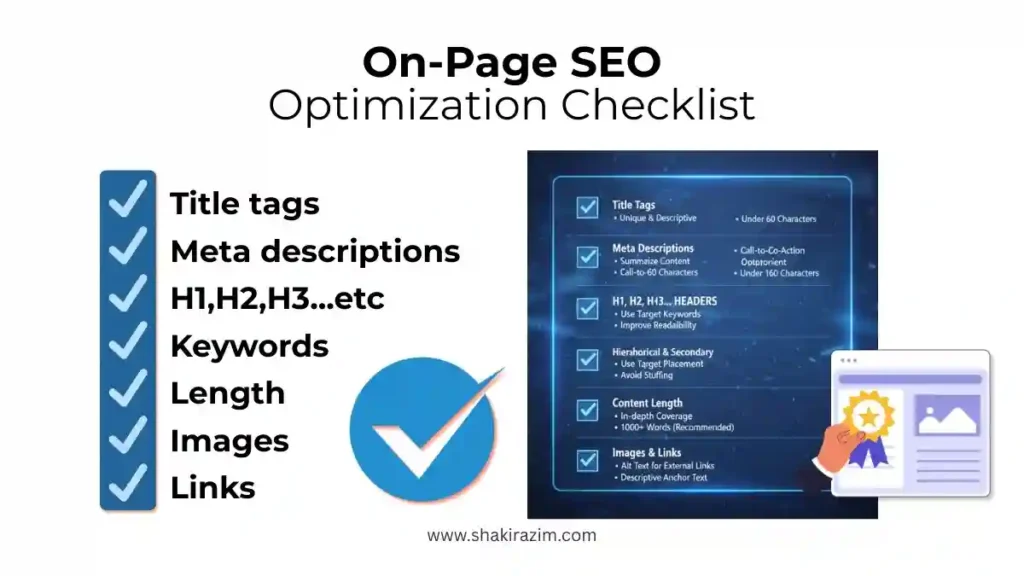
Tags for Titles and Meta Descriptions
People don’t realize how important these tiny things are. Your title tag shows up in search results and in the tabs of your browser. In search results, your meta description comes up underneath your title.
This is the formula that works:
- Title tag: Include your target term in the title tag in a way that seems natural. It should be 50 to 60 characters long and make people want to click on it. “WordPress SEO Optimization: Complete 2025 Guide” is an example.
- Meta description: If you can, put your keyword in the first 30 characters of your meta description. Use action-oriented language and keep it between 155 and 160 characters. “Learn WordPress SEO optimization with proven strategies. Covers RankMath setup, schema markup, and local SEO for small businesses” is an example.
Don’t just put in a lot of keywords. First, write for people. Use RankMath to do this in a methodical way (the free version works nicely). You’ll save a lot of time.
How to Set Up Headings and Place Keywords
You should only use your H1 tag once every page, and it should have your main keyword in it. It’s the top part of your page. Then use H2 and H3 tags to separate the content in a way that makes sense.
People typically overthink things here: you don’t need to put keywords everywhere. Use your main keyword and two or three related variations in a natural way throughout the content. Write like you talk. You’re doing it wrong if keyword optimization makes the writing sound strange.
I’ve made a full guide to the right on-page SEO checklist. It covers everything you need to check before you publish.
Length and depth of content
Longer material usually does better in search results. This isn’t because Google likes longer content; it’s because longer information usually answers inquiries more fully.
For keywords that are hard to rank for, try to write at least 2,000 words. For less competitive phrases, 1,500 words is usually plenty. But depth should come before length. A 2,500-word post that repeats itself is worse than 2,000 words of useful, focused content.
Write about things you really know about. AI-generated information can’t equal the credibility that your experience gives you. Be detailed, give real instances, and talk about what you’ve learnt.
3. Schema Markup: How to Talk to Google
Schema markup is a feature that most WordPress users don’t even know about. This is the structured data that tells search engines what your content is about.
Google makes estimates without schema markup. With that, you’re clear.
You could say to Google, “This is a blog post about WordPress SEO, published on November 30, 2025, written by Shakir Azim.” Google would then know what you mean without having to figure it out.
Distinct types of content need distinct schemas:
- Article schema is used for blog postings.
- LocalBusiness schema is used by businesses in the area.
- FAQPage schema is used for Q&A material.
- Organization schema is used by organizations.
WordPress is great because plugins typically take care of things on their own. For example, RankMath makes schema with very little setup.
But here’s the next step: don’t just let it happen automatically. Use Google’s Rich Results Test to see what schema your site is currently using. There will be occasions when the plugin misses chances to add extra detail.
I’ve written a lot about the basics of schema markup for technical SEO, including how to use it in real life with examples from healthcare and real estate websites.
4. The Underrated Ranking Factor: Internal Linking Strategy
This is where most people who run WordPress sites go wrong.
When you link to your own pages, it tells Google what information is significant and how your site is set up. Also, this is how you give power from one page to another.
Links that don’t make sense and have vague anchor text like “click here” are examples of bad internal linking.
When you use descriptive anchor text to link to related material on your own site, that’s good internal linking.
For example, if your major keyword is “WordPress SEO optimization,” you may link to posts that are relevant to it, such “how to optimize your WordPress site for local SEO” or “WordPress performance optimization tips.” These links help Google figure out how topics are related.
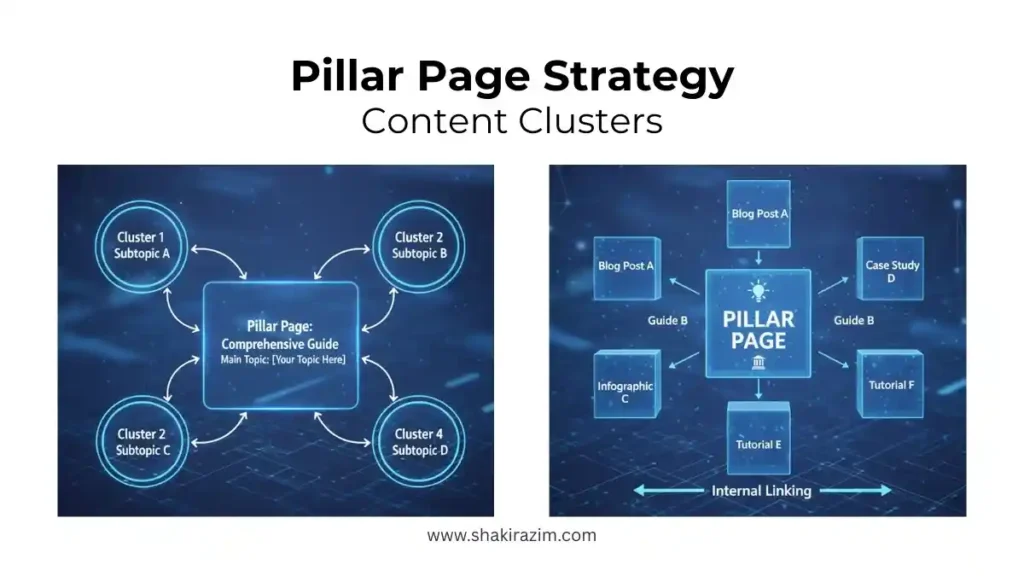
The plan is to make content clusters where one pillar page (a full guide) links to several cluster articles (supporting information), and those cluster articles link back to the pillar.
My internal linking strategy guide outlines how to set this up for the best results. When you add this to the right topic clustering for SEO, you’ll make a content structure that Google will adore.
5. How to Set Up Your WordPress Site for SEO
Your permalink structure is more important than you might realize.
Use the /%postname%/ format to keep it simple. This makes URLs like yoursite.com/wordpress-seo-optimization/ instead of yoursite.com/2025/11/30/wordpress-seo-optimization/.
Don’t have too many pages for categories or tags. These can cause problems with duplicating content and lower the authority of your site.
Put your stuff in a logical order. Make a clear WordPress site structure so that both visitors and Google can see how your material fits together.
Getting the Basics Right for Keyword Research and Targeting
Let’s discuss about keyword selection, which is something that most WordPress owners get wrong.
A lot of people guess at keywords. They want to rank for “SEO,” but they don’t know why they can’t. Of course you can’t; there are millions of pages about SEO.
Real keyword research is selecting words that: – Have a lot of searches – Aren’t too hard to beat in terms of competition – Fit with what your firm actually does
Here’s what you should focus on for WordPress SEO:
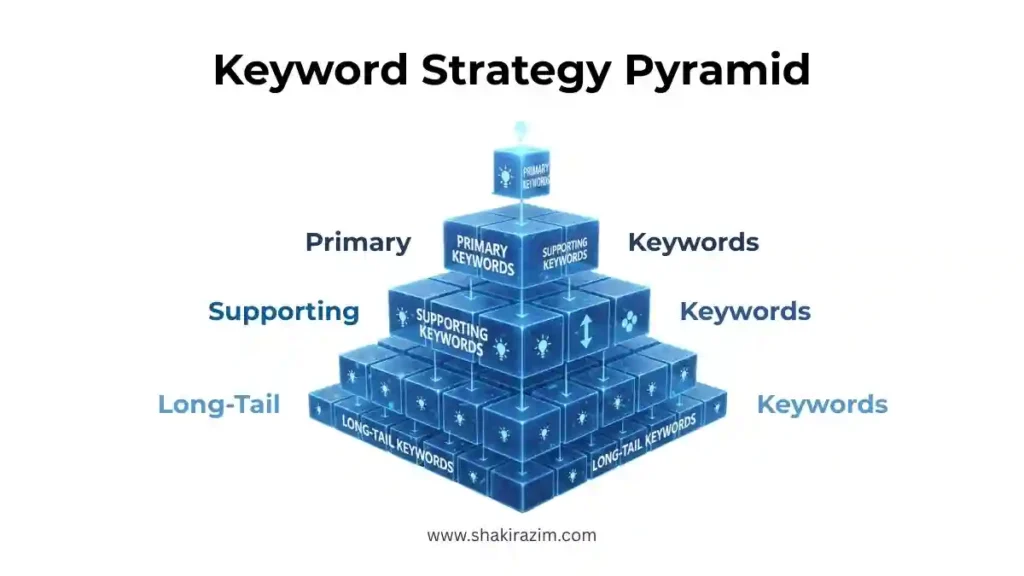
Primary Keywords (What You Should Focus On)
These are the main ideas you should think about. They are usually competitive, but they get a lot of searches. “WordPress SEO optimization,” “local SEO for WordPress,” and “WordPress website speed optimization” are some examples.
These should be the main pages that hold your pillar pages together. These are the in-depth guides that will lead your content strategy.
Supporting Keywords (Keywords that support your content clusters)
These are versions that are more particular and less competitive. “How to make your WordPress site faster,” “Best practices for WordPress SEO,” and “How to use WordPress schema markup.”
These are the individual blog posts that all connect back to your pillar pages.
Long-Tail Keywords (Your Quick Wins)
These are phrases that are very particular and have little competition. “How to add schema markup to WordPress,” “Configuring WordPress LightSpeed Cache,” and “Elementor Pro SEO optimization” are all examples.
These are frequently easier to rank for and can bring in visitors while you wait for your core keywords to do the same.
The main point is that AI search optimization is now important since Google is giving sites who know how to write for AI search engines more traffic.
Your Action Plan: A Useful WordPress SEO Checklist
Allow me to give you something beneficial right away. Here’s what you need to do:
Week 1: Basic Technical Skills
- Install an SEO plugin, like the free version of RankMath or Yoast
- Turn on SSL and make HTTPS the only option
- Set up your XML sitemap and send it to Google Search Console
- Look at your site’s Core Web Vitals in Google Search Console
- Put in a caching solution and a performance plugin
- Make the load time of your homepage as short as possible
Week 2: Improving Your Website’s Pages
- Check the title tag and meta description on your homepage
- Make sure that the headings in your main text are set up correctly
- Put schema markup to your main page
- For local SEO, make a Google Business Profile
- Make your first pillar page using your main keyword
Week 3: Links and Content Inside
- Write 2–3 articles that use keywords to support your main point
- Set up a strategic structure for linking within your site
- For each new post, add 3 to 5 high-quality internal links
- From supporting content, link back to your pillar page
Week 4 and beyond: Keeping things the same and improving them
- Put out 2–3 new pieces of material every week
- Check the ranks of your keywords in Google Search Console
- Add new information to material that isn’t doing well
- Make content clusters out of posts that do well
Here’s what’s different:
- Use keywords that are specific to the area in titles and descriptions
- Make landing pages for each service area based on where they are
- Add LocalBusiness schema markup to your website with all of your business’s details
- Fully optimize your Google Business Profile
- Get local citations by having your firm included in local directories
This usually indicates for WordPress:
- Adding a dropdown for locations or more than one location page
- Using schema that is specific to a location
- Making local content that talks about your service region
- Getting links from local directories
Most of this stays in WordPress, which is good news. You’re just making sure to optimize for local search from the start.
Things to Avoid When Doing SEO on WordPress
To save you time, let me tell you what doesn’t work (or hurts):
Every heading has the same exact match keywords
Too much keyword stuffing looks spammy and is hard to read. Use your keyword in a way that makes sense. Use similar changes. First, write organically. Then, make it better.
Not Paying Attention to User Intent
Some keywords are about how to find information. Some are about finding a service provider. Rank for keywords that match what you’re really selling. People that require a service provider instead of a blog post won’t find it.
Set It and Forget It
You can’t just do WordPress SEO once. As Google makes changes and more people compete, search rankings shift. Check your rankings every month. Add new information to old content. Make what’s working bigger. This is not a side project; it’s upkeep.
Not Paying Attention to Link Quality
Not all links are the same. Those from well-known, relevant websites are more important than those from random sites. Concentrate on getting connections from sites in your field and creating natural link relationships over time.
Problems with Duplicate Content
WordPress can make extra pages by mistake. To avoid having both www and non-www versions, look at your settings. If you don’t use tag pages, turn them off. If there are duplicates, use canonical tags to make it clear which version is the “official” one.
I’ve written a lot about specific SEO mistakes to avoid, including ones that WordPress developers make over and over again.
Advanced WordPress SEO: Digging Deeper
After you’ve mastered the basics, think about these more advanced strategies:
Topic Clusters for Power
Put your information into topic clusters, with one pillar page covering a big topic and several cluster articles covering smaller themes. Each cluster article has links to the pillar and to other cluster articles.
This shows Google that you are an expert in your field. Learn how to build topic clusters for SEO for comprehensive authority.
Generative Engine Optimization (GEO)
The optimization game is shifting as search engines get better at giving straightforward answers. You’re not only making things better for regular search engines; you’re also making things better for AI-generated replies.
This means:
- Use straightforward, direct statements instead than obscure ones
- Add examples and facts that are relevant
- In the first paragraph, answer the question directly
- Give new data or research
I’ve looked into how GEO is reshaping SEO strategy in detail. It’s worth understanding, as it affects what you optimize for. This ties directly into understanding AI search optimization and how modern search engines evaluate content.
Content Strategy for Long-Term Growth
Real SEO growth comes from a content strategy, not sporadic posts. This means understanding your audience deeply, identifying the topics they care about, and building content strategically around those topics.
This is more art than science—but d>content strategy for creators that covers how to think about this strategically.
Tools That Really Help
You don’t need to spend a lot of money on SEO tools to do well with WordPress. This is what I think you should do:
Essential (Free) – Google Search Console: Find out the keywords you’re ranking for and how well you’re doing – Google Analytics: Find out where your traffic originates from and how users act – RankMath (free version): Keep track of on-page SEO, schema markup, and more
Highly Useful ($) – RankMath Pro: Advanced capabilities and improved tracking – Semrush or Ahrefs: Analyze your competitors and do keyword research – Google PageSpeed Insights: Get detailed performance advice
To be h>the best SEO tools available, which covers trade-offs between options and which ones are worth investing in.
The Truth About WordPress SEO Rankings
I want to be honest about what I expect from the timeframe.
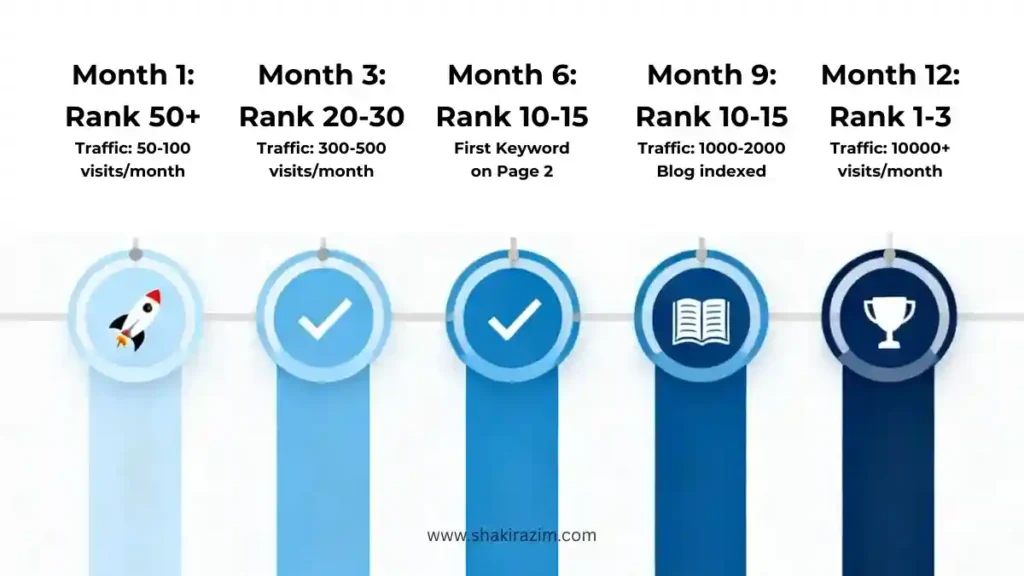
In three weeks, you won’t be on page one. No, that’s not how it works. Real SEO takes time since Google has to do the following things: – Crawl your site – Index your pages – See how your site builds authority over time – Watch how people engage with your content
Realistic timeline: – Months 1–2: Your site gets indexed but doesn’t rank well – Months 3–4: Long-tail keywords start to rank – Months 5–6: Some main keywords show up on pages 2–3 – Months 7–12: Main keywords start to rank on page 1
This schedule is based on the idea that you’re doing well and competing in areas that aren’t too hard. It can go faster if you are going after less competitive keywords or already have some authority.
The key is that WordPress SEO is a long game. But done right, it’s one of the most stable, long-term traffic sources you can build. Understanding the SEO digital growth guide strategy helps you plan this out.
What You Should Do Next: Making This Happen
Reading this doesn’t change the rankings. What does action do?
Here’s what you need to do:
- Begin with the basics of technology. Install RankMath, check the speed of your site, and make sure it works on mobile devices. This takes a whole weekend.
- Make a page that is a pillar. Choose your major keyword and write a whole guide. Put a link to it on every page.
- Make stuff that supports it. Write four to five entries that use keywords that are related to your topic. Connect everything to your main point.
- Keep an eye on the results. Look at Google Search Console once a month. Keep an eye on which terms are getting more popular.
- Keep going back and making things better. Make changes to content that isn’t functioning well. Make what’s working bigger. Keep gaining authority.
Yesterday was the greatest time to start. Today is the second best time.
It’s not hard to do WordPress SEO; you just have to be careful
The bottom line is that to be successful with WordPress SEO, you need to do the boring work every day.
It’s not about uncovering a secret hack. It’s about: – Making a website that works well technically – Writing useful material that answers actual issues – Linking that information in a smart way – Gaining authority over time by being consistent
This guide talks about the strategy. But keep in mind that knowing something and putting it into action are two very different things.
Most people read tutorials like this, feel like they know what to do, and then go back to making content without a plan. Please don’t be that person.
Choose one thing to work on this week. It may be site speed, internal linking, or developing your first pillar page. Do that one thing well. Then choose another one for next week.
In six months, your WordPress site will be fully optimized in all of these areas. That work will show in your rankings.
That’s the only way to really succeed at WordPress SEO. It doesn’t look nice, but it works.